

Choose your server
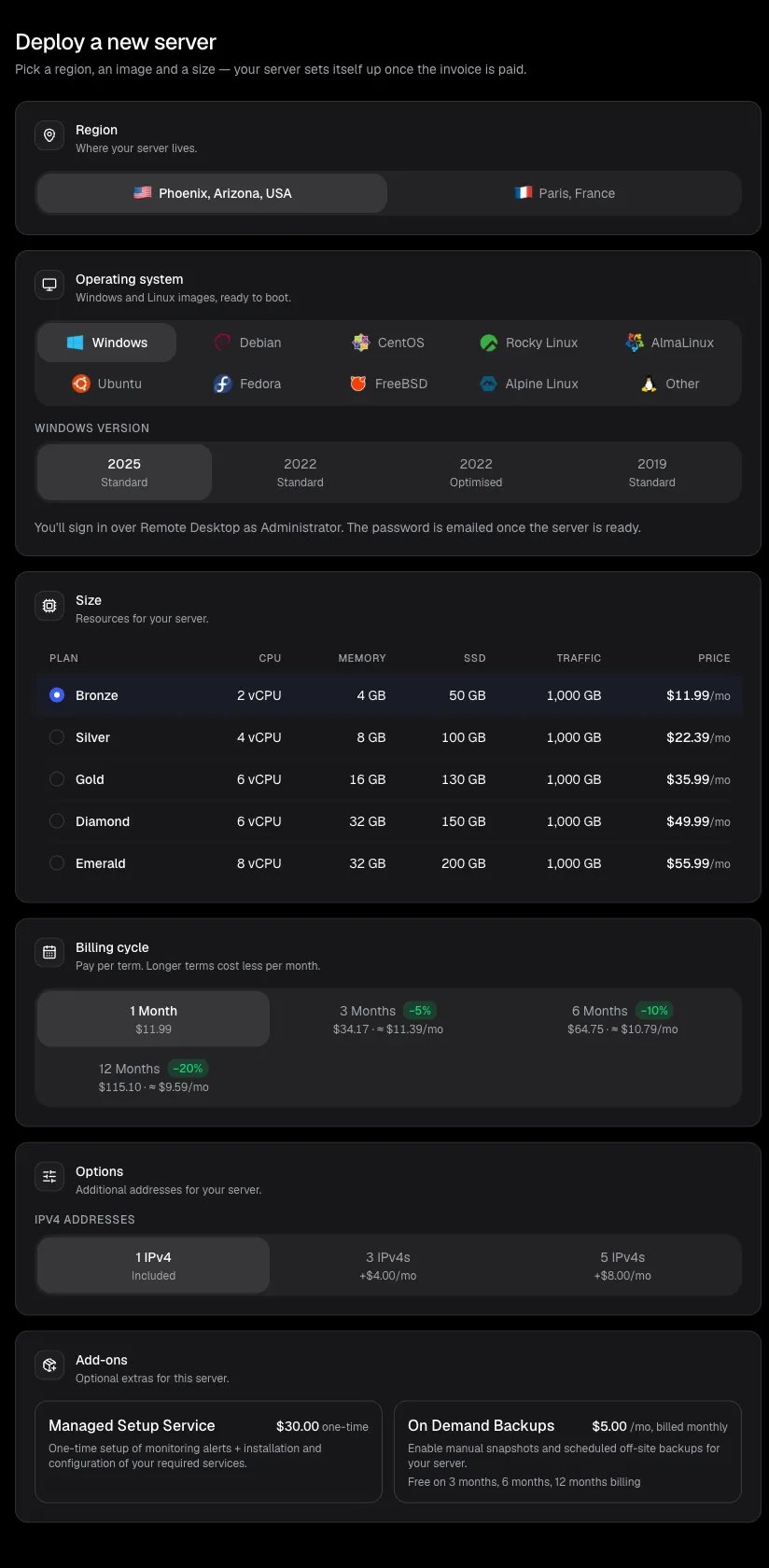
The Deploy page
1
Open Deploy
Sign in to the Billing Portal and click Deploy in the sidebar, or Deploy server on the Dashboard. New here? Create an account first.
2
Region
Pick Phoenix, Arizona, USA or Paris, France. Choose the one closest to you or to the services your server talks to.
3
Operating system
Pick Windows or a Linux or BSD family (Debian, Ubuntu, AlmaLinux, Rocky Linux, CentOS, Fedora, FreeBSD, Alpine Linux and more), then the version.
- Windows: you sign in over Remote Desktop as
Administrator. The password is emailed once the server is ready. - Linux: you sign in over SSH as
root.
4
Size
Pick a plan: BRONZE, SILVER, GOLD, DIAMOND or EMERALD. Each shows its CPU, memory, SSD storage and price. See Plans and pricing.
5
Billing cycle
Pay for 1 Month, 3 Months, 6 Months or 12 Months. Longer terms cost less per month (5%, 10% and 20% off) and include backups at no extra cost. You can’t switch the billing cycle yourself later; that needs a support ticket.
6
Options and add-ons
- IPv4 addresses: one is included; you can add more.
- Add-ons: for example On Demand Backups (included on 3, 6 and 12-month terms) or a one-time Managed Setup Service.
7
Linux only: SSH access
Choose a saved SSH key, paste a new public key with Add custom SSH key, or pick No SSH key to use a password. See Manage SSH keys.
Review and pay
1
Check the order summary
The Order summary lists the region, image, plan, IP addresses, how you sign in, and the price, including any savings and your account discount.
2
Apply a promo code (optional)
Click Have a promo code?, enter the code and click Apply. If you change the plan or term later, the code is checked again.
3
Click Deploy server
An invoice is created and opens. Tax, if any, is added on the invoice.
4
Pay the invoice
Pay with account credit, cryptocurrency, or credit and debit cards and regional payment methods. Account credit is not applied automatically; choose it on the invoice. See Invoices, payments and credit.
After payment
The invoice page shows the setup progress: Payment, Provisioning, then Server ready. Some payment providers take a minute to confirm; the page updates by itself. On average within 3 minutes of payment (a few minutes longer for some operating systems), your server appears under Servers and its login details are emailed to you. Next steps:- Connect to your Windows RDP or connect to your Linux VPS over SSH
- Can’t find the password? See Find your server credentials.
- Windows: secure your Windows RDP right after your first sign-in.
- Setup taking longer than an hour? See Server troubleshooting.
If you leave the Deploy page before ordering, your choices are kept in that browser tab and restored when you come back.
Related Articles
Plans and pricing
Compare plans and billing cycles.
Payment methods
Pay with cryptocurrency or card.
Connect to Windows RDP
Remote Desktop from any device.
Connect over SSH
Sign in to your Linux VPS.