

How to get help
Open a support ticket
For technical issues, server management, billing questions, or anything that requires us to look at your account, opening a ticket is the best and most secure way to get help. You can open a ticket at any time. Our team answers tickets during the support hours below; tickets sent outside those hours are answered when the team is back online.- Sign in to the Billing Portal and open Tickets → New ticket. No account yet? Create one first; it takes a minute.
- Choose a Department:
- Support Desk: Handles technical issues, server management, and account-related concerns.
- Abuse Desk: Report misuse, spam, or security incidents for rapid review.
- Presale Desk: Ask about plans, pricing, and architecture fit before you buy. Prefer not to sign up yet? Use the live chat on flashrdp.com/help.
- Pick the affected server under Related server (if any) so we can see it right away.
- Add a Subject and a Message (Markdown works; never include passwords). Attach screenshots or logs if they help: JPG, PNG, GIF, PDF or TXT, up to 3 files of 5 MB each (10 MB in total).
- Click Open ticket.
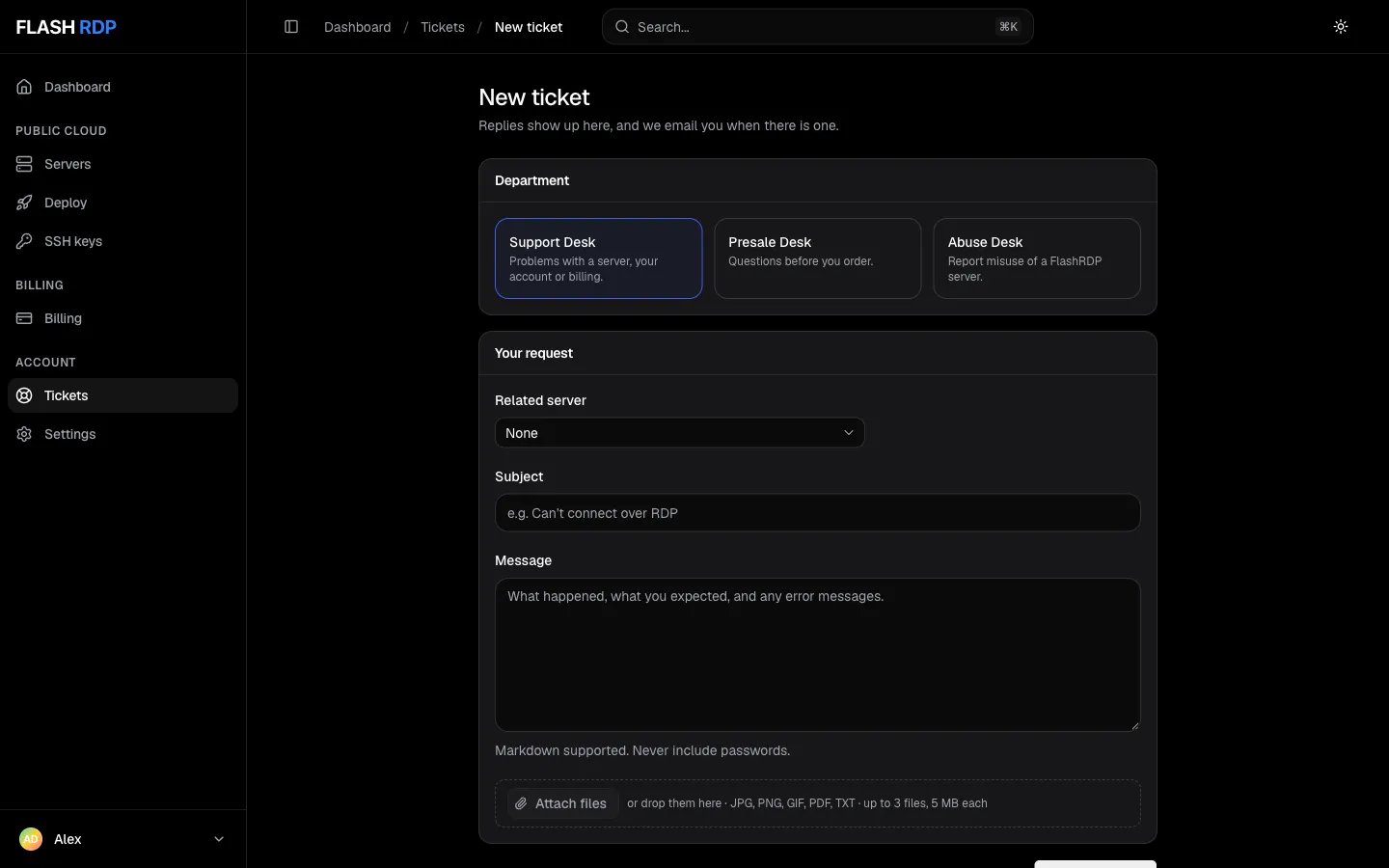
Open a ticket from the Billing Portal
abuse@flashrdp.com.
Live chat
Once you are signed in to the Billing Portal, the chat button in the bottom-left corner connects you to our team. Your account details are passed along, so you don’t need to explain who you are.Telegram
If you have a quick question or want to chat with an engineer in real-time, you can reach out to us on Telegram. Tickets are best for detailed issues; Telegram is fastest for quick checks.- Direct Support (Telegram): Chat with our team
- Updates Channel: @FlashRDP
- General Support:
support@flashrdp.com - Legal:
legal@flashrdp.com - Abuse/Security:
abuse@flashrdp.com - Privacy and data requests:
privacy@flashrdp.com
Support hours
Our team works on Asia/Kolkata (GMT+5:30) time. Replies are fastest during these hours:
These hours aren’t guaranteed on weekends and public holidays.
Outside these hours you can still open tickets, and we answer them when the team is back online.
How to get a faster answer
When you open a ticket, giving us specific details right away helps us solve the problem on our first reply instead of asking follow-up questions. Always include:- Which server: Pick it under Related server in the ticket form, or give its hostname or IP address.
- Exact error message or screenshot: If you’re getting an error message when trying to connect via RDP or SSH, a screenshot is incredibly helpful.
- Time window: The exact time the issue occurred in UTC.
Lost your server password? We don’t have access to your server passwords. Set a new one yourself: open the server in the Billing Portal and click Reset next to Password. Your data stays as it is, and the new password appears on screen. See Reset server password.